
Pairwise testing
Compare all combinations with Pairwise, then apply exclusions to build your test set.
Generate combinations →- No account or installation
- Copy or download results
- Documents processed in your browser
File sizes and generation counts have limits. Check the limits shown in each tool.
Worked example · fictional specification
Design tests with an excluded combination
Each of Browser, OS and Role has two values. This fictional project excludes Edge on macOS from its supported configurations; it is not a claim about browser compatibility.
1. Enter the specification
Browser: Chrome, Edge
OS: Windows, macOS
Role: User, Admin

OS=macOS & Browser=Edge
2. Read the result
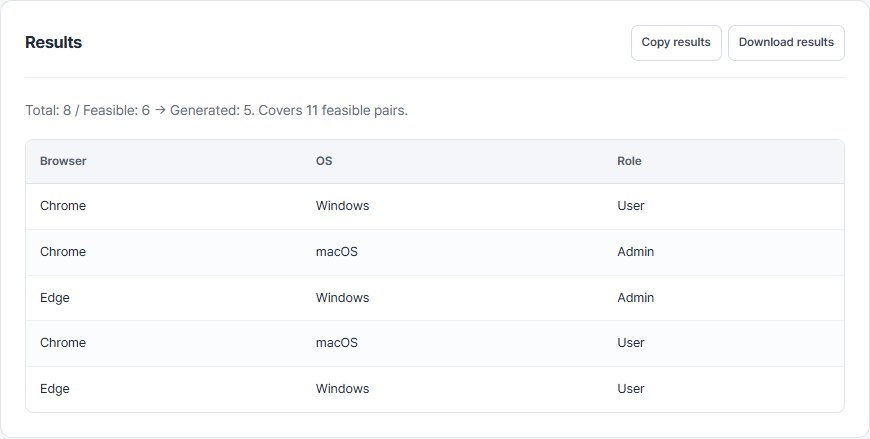
Exclusion leaves 6 of the 8 full combinations. The current tool produces 5 rows covering all 11 feasible value pairs. This differs from the four-row example without exclusions.
| Browser | OS | Role |
|---|---|---|
| Chrome | Windows | User |
| Chrome | macOS | Admin |
| Edge | Windows | Admin |
| Chrome | macOS | User |
| Edge | Windows | User |
View the actual tool screen
3. Prepare the execution cases
Regenerate with the exclusion rule instead of deleting rows from an existing reduced set. Add targeted cases for risky three-factor interactions. This matrix has no service-specific expected outcomes; define supported screens and role behavior from your specification.
The workbook includes input assumptions, cases and blank actual-result fields. It is not a record of successful service tests. Workbook contents are in Korean.
Written by QA Workbench · checked 8 October 2026. Boundary values, feasible pair coverage and the six template fields are compared against the current tools; execution against a real service is outside this example.